Managing Connected Repositories
Once repositories are connected, users with the Manage Integrations permission can review and manage them from one place.
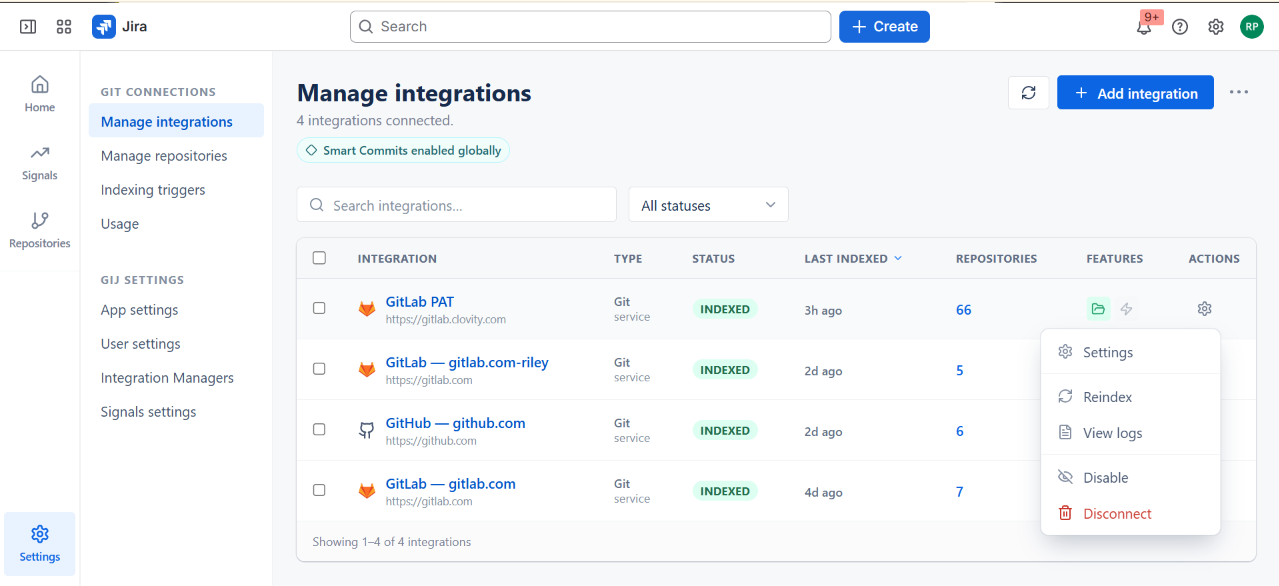
Manage Integrations Screen
Open Apps → GitConnect for Jira → Manage Integrations to see every connected integration, along with a search box and a status filter. A Smart Commits enabled globally indicator also appears on this screen.
| Column | Description |
|---|---|
| Integration | Integration display name and its hosting URL |
| Type | The integration method, e.g. Git service |
| Status | Indexed, or an error state if the last sync failed |
| Last Indexed | Time of the most recent index run (sortable) |
| Repositories | Number of connected repositories - click to view them |
| Features | Icons showing which capabilities are enabled for this integration (e.g. Repository Browser, Indexing Triggers) |
| Actions | Opens the row's action menu |
Common Actions
Each integration row's Actions menu (gear icon) provides:
| Action | What It Does |
|---|---|
| Settings | Opens the integration's settings, including updating credentials |
| Reindex | Triggers a fresh full sync of the repository's commits, branches, pull/merge requests, pipelines, and deployments |
| View logs | Shows the integration's indexing log |
| Disable | Temporarily pauses the integration without disconnecting it |
| Disconnect | Stops syncing new activity for the repository. Previously indexed data on Jira issues is retained |
Indexing Triggers (Webhooks)
In addition to scheduled syncs, GitConnect for Jira can index activity as it happens using webhooks configured on the repository. Manage these from the integration's Indexing Triggers settings - useful when you want new commits or merge requests to appear in Jira without waiting for the next scheduled sync.
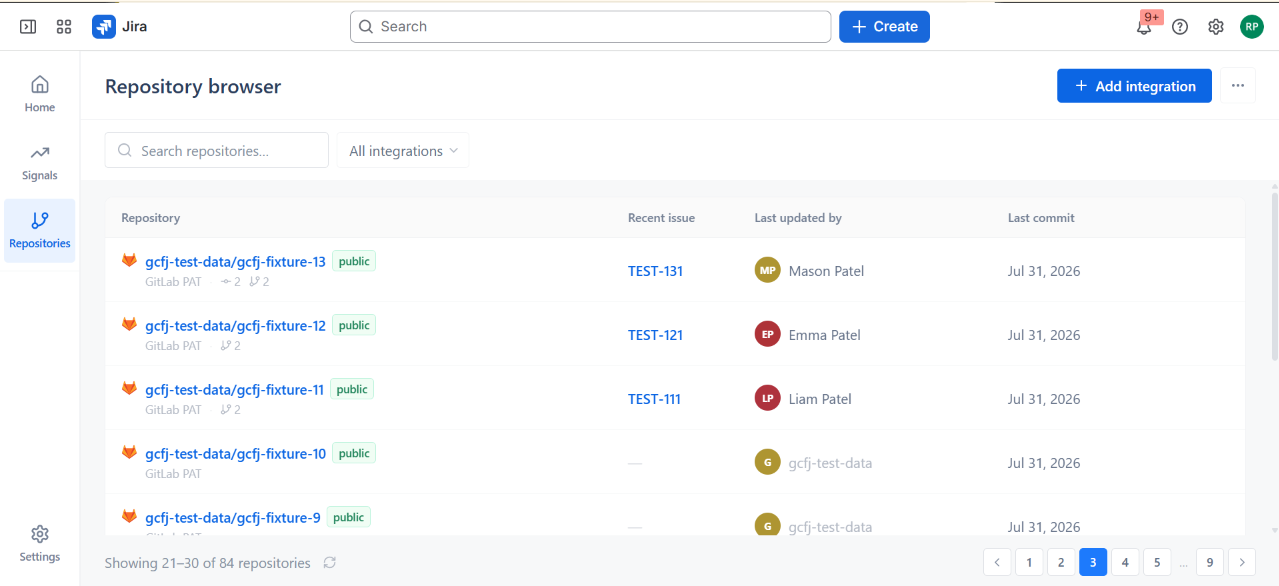
Repository Browser
Open the Repositories icon in the left navigation to see every repository across all connected integrations in one searchable, filterable list. Use Search repositories or the All integrations filter to narrow the list.
| Column | Description |
|---|---|
| Repository | Repository name, visibility (e.g. public/private), and which integration/auth method indexes it |
| Recent issue | The most recently linked Jira issue key, if any |
| Last updated by | The user who made the most recent change |
| Last commit | Date of the most recent commit |
Click a repository to drill into its details.
Sync Status: Error
If a repository shows a sync Error, check:
- Whether the personal access token or OAuth grant has expired or been revoked
- Whether the token's scopes still include repository read access
- Whether the repository was renamed, transferred, or deleted on GitHub or GitLab
See Common Setup Issues for more troubleshooting steps.