Development Activity in Jira
Once a repository is connected, GitConnect for Jira surfaces development activity in three places: the Issue Activity panel, two issue tabs, and a project-level page.
How Activity Gets Linked
GitConnect for Jira matches development activity to Jira issues by looking for an issue key (e.g. PROJ-123) in:
- Commit messages
- Branch names
- Pull/merge request titles
Issue Activity Panel
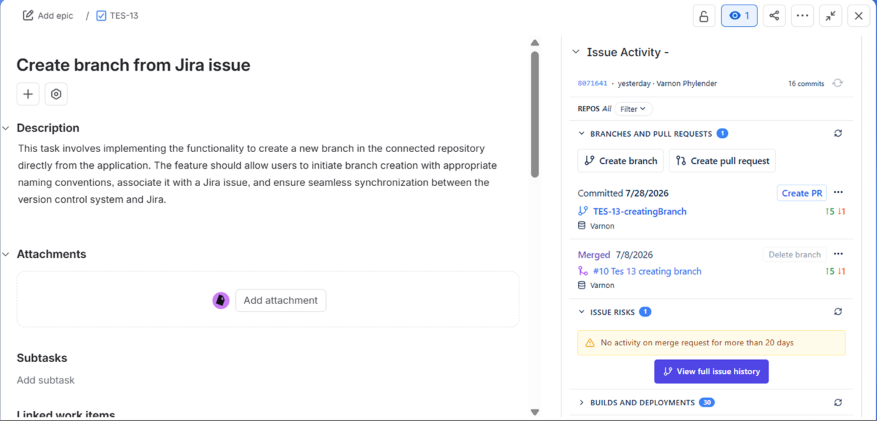
On every Jira issue, the Issue Activity panel shows a summary line with the latest commit (short SHA, relative time, author) and the total commit count, followed by collapsible sections:
| Section | What It Shows |
|---|---|
| Branches and Pull Requests | Linked branches and pull/merge requests, each with the action taken (Committed, Merged), date, diff stats (lines added/removed), and the committer. Includes Create branch and Create pull request buttons |
| Issue Risks | Risk banners for the issue, such as no recent activity on a linked merge request, with a link to view the full issue history |
| Builds and Deployments | Linked CI/CD pipeline runs (GitHub Actions / GitLab CI) and deployments |
| Tags | Git tags associated with the issue's linked commits |
Each section header shows a count badge for its items and can be expanded or collapsed. If the issue has activity across multiple repositories, use the Repos filter at the top of the panel to scope the view to a single repository.
Git Commits Tab
The Git Commits issue tab shows the full commit feed for the issue, grouped by repository, with a diff view available for each commit.
Git Roll Up Tab
The Git Roll Up issue tab summarizes all linked development activity for the issue: overall counts, a per-developer breakdown, and a file-level roll-up of what changed.
Project-Level Git Commits Page
Jira projects get their own Git Commits page in the project sidebar, showing a project-scoped commit feed across every repository mapped to that project. Use the repository picker on this page to map a Jira project to one or more connected repositories.