User Guide
Signals: Engineering Delivery Dashboard
Signals is GitConnect for Jira's engineering delivery dashboard. It combines Jira issue data with GitHub and GitLab activity to give a project- and sprint-level view of delivery health, without leaving Jira.
Open Signals from Apps → GitConnect for Jira → Signals.
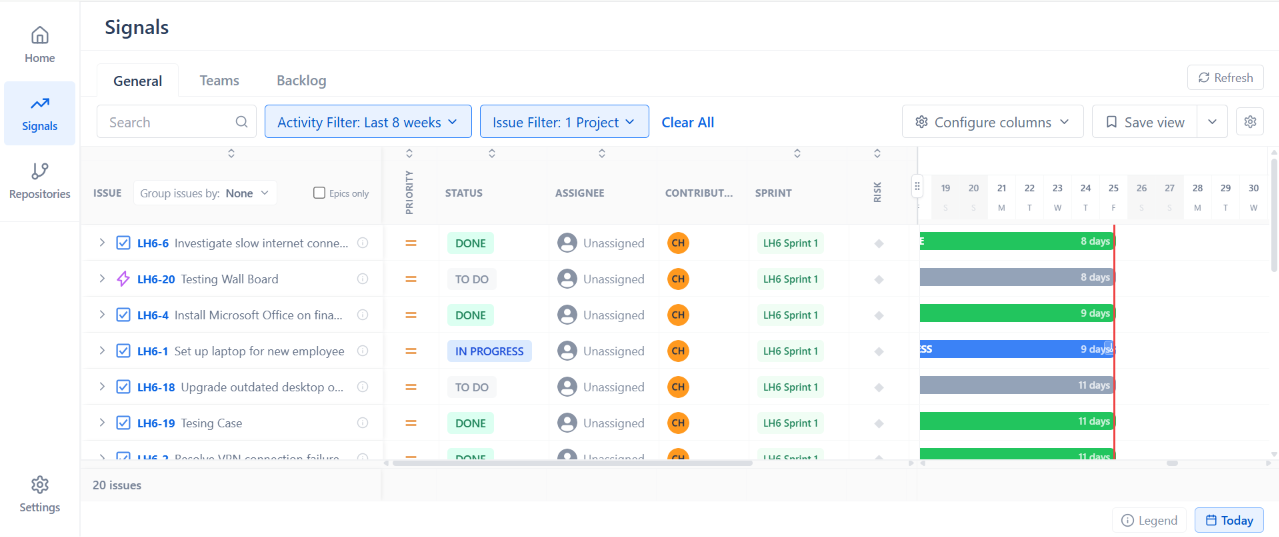
Views
| View | What It Shows |
|---|---|
| General | A list of Jira issues with columns for priority, status, assignee, contributors, sprint, and risk, alongside a day-by-day timeline (with a marker for today) showing time spent in each status. Use Activity Filter and Issue Filter to scope the view, Group issues by to group rows, Epics only to narrow to epics, and Configure columns or Save view to customize and reuse a layout. |
| Teams | One row per team member, showing issues assigned vs. issues worked on, time spent, and git activity. |
| Backlog | Issues organized by sprint, for sprint planning and spotting items that need attention before a sprint starts or ends. |
Issues Assigned vs. Issues Worked On
In the Teams view, each member has two counts:
- Issues Assigned - issues where they are the Jira assignee
- Issues Worked On - issues where they have a linked commit or merge request, but are not the assignee
This distinguishes who is formally assigned to an issue from who is actually contributing development work to it.
Filtering
Use the risk filters (for example At risk or Blocked) to narrow the issue list down to items that may need attention.
Note: Signals reflects data from all connected repositories and requires at least one completed sync before data appears.