Forecast & Milestones
Forecast Tab
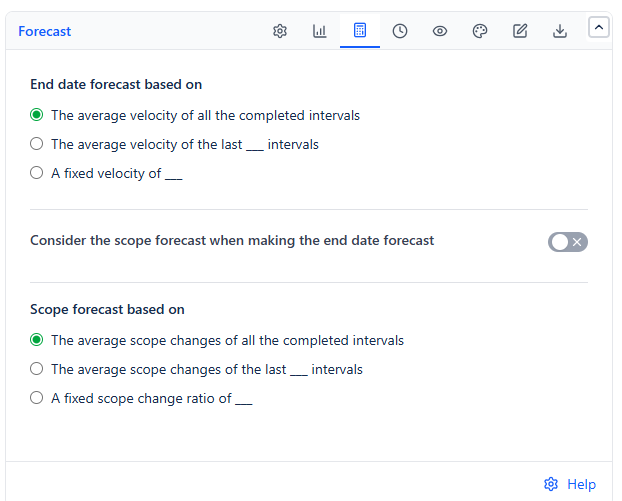
The Forecast tab decides how the four dashed forecast series and the ETA badge are calculated. Turn the forecast series on in the Series tab to see them.
End date forecast based on
| Option | Velocity Used | Default |
|---|---|---|
| The average velocity of all the completed intervals | Average work completed across every completed interval on the chart | Selected |
| The average velocity of the last ___ intervals | Average of only the most recent completed intervals - useful when older intervals no longer reflect the team's pace | 3 intervals |
| A fixed velocity of ___ | A velocity you type, as burned work per interval - useful before enough intervals have completed | - |
Consider the scope forecast when making the end date forecast
Off by default. When on, the end date forecast also accounts for predicted scope growth, not just velocity. If scope grows as fast as or faster than work is completed, the forecast says the remaining work is not expected to finish, instead of showing a misleading date. It affects every forecast series except Forecast Scope.
Scope forecast based on
| Option | Scope Change Used | Default |
|---|---|---|
| The average scope changes of all the completed intervals | Average scope change across every completed interval | Selected |
| The average scope changes of the last ___ intervals | Average of only the most recent completed intervals | 3 intervals |
| A fixed scope change ratio of ___ | A scope change per interval you type | - |
If last ___ intervals is chosen and fewer intervals than that have completed, Forecast Scope is not drawn.
The forecast sentence
A sentence below the chart explains the forecast, for example: Forecast: the current remaining work is expected to finish on 10/14/26, if the average velocity will be 16 burned Story Points per 1 week-long interval.
When no forecast can be drawn, the sentence says why:
| Message starts with | Reason |
|---|---|
| Forecast: the remaining work is already complete. | Nothing is left to do |
| Forecast not displayed because the release is already finished. | The release end date is in the past |
| Forecast not displayed due to insufficient completed time intervals... | last ___ intervals is chosen and not enough intervals have completed yet |
| Forecast not displayed because the ... velocity (...) is too low. | The velocity is below the minimum needed for a reliable forecast |
| Forecast: at the current rate, the remaining work is not expected to finish | Velocity is zero or negative, or scope grows faster than work is completed |
Milestones Tab
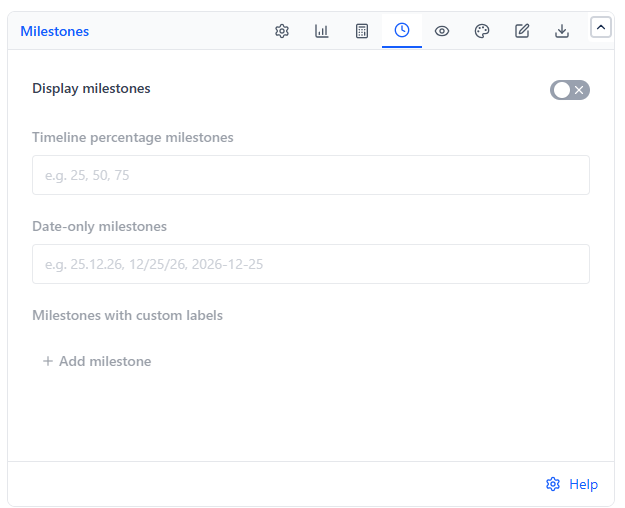
Turn on Display milestones to show your milestones on the chart. A past milestone is colored red if Remaining was above Ideal Burndown at that time, or green if it was below - showing whether the milestone was reached.
| Field | What You Enter | Example |
|---|---|---|
| Timeline percentage milestones | Comma-separated percentages along the release timeframe | 25, 50, 75 |
| Date-only milestones | Comma-separated dates | 25.12.26, 12/25/26, 2026-12-25 |
| Milestones with custom labels | A date and a label per row. Click Add milestone for another row, or the trash icon to remove one | 25.12.26 - Code freeze |
How dates are read
- Dots, dashes or spaces are read day first: 25.12.26 = 25 December 2026
- Slashes are read month first: 12/25/26 = 25 December 2026
- YYYY-MM-DD is read as written
- If a date only makes sense the other way round, it is read that way instead - 22/02/30 is 22 February 2030
- Dates before the chart begins are ignored; a later date widens the chart to reach it