Smart Labels
Smart Labels add a colored badge to any issue that matches a condition. They make it easy to spot critical, overdue, blocked, or high-risk issues at a glance - without filtering the table.
How Smart Labels Work
A Smart Label adds a new indicator column to the table. When an issue matches the label's condition, a colored badge appears in that column. Issues that don't match show an empty cell.
Multiple Smart Labels can be active at the same time - each gets its own column.
Two Types of Smart Labels
| Type | How It Works | Best When |
|---|---|---|
| JQL-Based | Shows badge if the issue matches a JQL condition | Custom conditions - overdue, blocked, SLA breach, any complex logic |
| Filter-Based | Shows badge if the issue matches a saved Jira filter | Reusing filter criteria already defined in Jira |
How to Add a Smart Label
- Open the Issue List gadget in edit mode
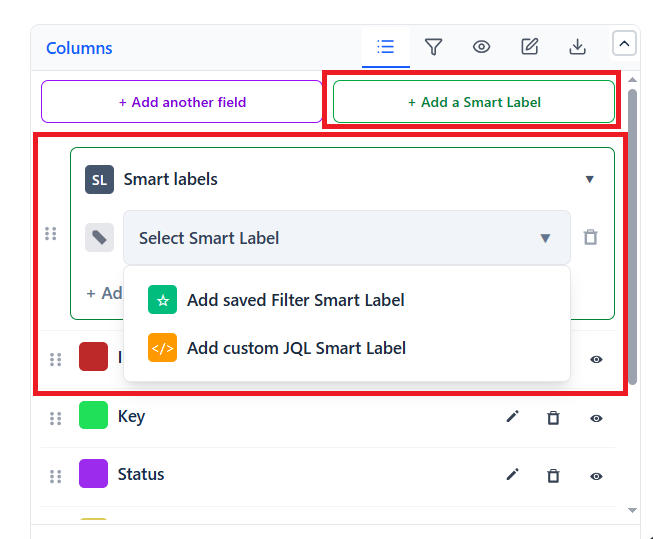
- Go to the Columns tab - Smart Labels sit below the column list, not in a tab of their own
- Click + Add a Smart Label
- Choose the kind by clicking the button you want:
- Add custom JQL Smart Label - you type the condition
- Add saved Filter Smart Label - you pick an existing Jira filter
- Enter the JQL condition, or select the saved filter
- Give the label a name (e.g., "Overdue")
- Save the gadget
Use + Add another Smart Label to add more.
The kind is decided by which button you click. There is no separate "type" dropdown, and no badge colour picker - the badge styling is applied for you.
Smart Label Examples
| Label | Type | Condition |
|---|---|---|
| Critical | JQL | priority = Highest |
| Overdue | JQL | duedate < now() AND resolution is EMPTY |
| Blocked | JQL | labels = blocked |
| Unassigned | JQL | assignee is EMPTY |
| Due Soon | JQL | duedate >= now() AND duedate <= 7d |
| Escalated | JQL | labels = escalated OR priority in (Highest, High) |
| My Watch | Filter | Any saved Jira filter you select |
Naming Conventions
Badge styling is handled for you, so the label name is what makes the table readable. Keep names short and unambiguous - they appear on every matching row:
- Overdue, Critical, Blocked for things that need action now
- Due Soon, At Risk for things approaching a deadline
- Watching, Mine for informational markers
- Ready for Review, Approved for positive states
Two or three labels is usually the limit before rows get noisy. If you need more distinctions than that, a Quick Filter is often the better tool - it narrows the table instead of adding another column.