Issue List Gadget
Overview
The Issue List gadget displays your Jira issues in a configurable table on your dashboard. It complements visual charts by showing the actual issues behind the numbers - with the columns, labels, and filters your team needs.
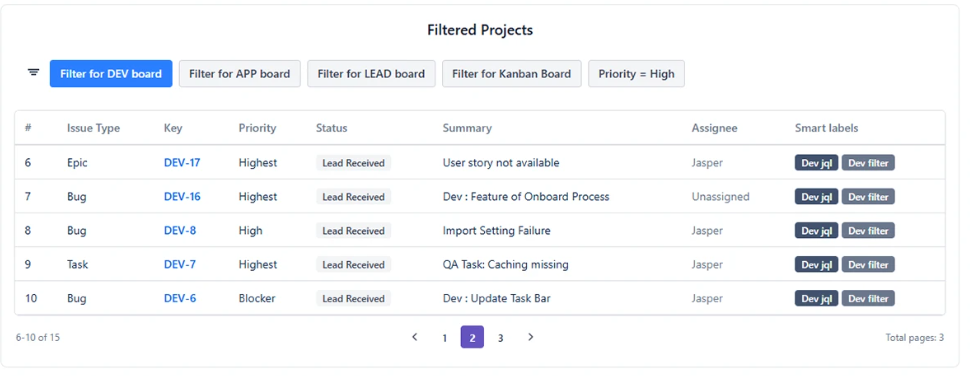
When to Use Issue List
Use Issue List when you need:
- The actual issues behind a chart segment (not just a count)
- A live sprint board or workqueue on a dashboard
- A filtered issue table for standups, triage, or reviews
- An exportable list for stakeholders
Data Sources
| Source Type | When to Use |
|---|---|
| Projects | Show all issues from one or more Jira projects |
| Board | Scope the table to a Jira Software board - the board's own filter is applied automatically |
| Saved Filter | Use a pre-saved Jira filter as the issue scope |
| Custom JQL | Write precise JQL to scope exactly which issues appear |
| Dynamic Filter Controller | Connect to a shared filter bar so users can filter the table interactively |
Feature Overview
| Feature | Description |
|---|---|
| Custom Columns | Add any Jira field as a column - standard or custom |
| Smart Labels | Badge indicators based on a JQL condition or a saved filter |
| Quick Filters | One-click filter buttons above the table, from JQL or a saved filter |
| AND/OR Filter Logic | Control whether multiple active filters narrow or broaden the result |
| Sorting | Click any column header to sort ascending or descending |
| Pagination | Show 5, 10, 20, or 50 issues per page |
| Templates | Pre-built table layouts for common use cases |
| Export | CSV, PNG, and PDF export for the currently filtered result set |
| Import/Export Config | Copy the full gadget configuration as a code, and paste it back to restore |
Configuration Tabs
| Tab | What It Controls |
|---|---|
| Columns | The column list, and Smart Labels below it |
| Quick Filters | The one-click filter buttons shown above the table |
| Display Options | Page size, row styling, timestamps, hyperlinks, text height |
| Description | Explanatory text shown with the table |
| Import/Export | Configuration sharing |
Smart Labels do not have a tab of their own - they sit under the column list in the Columns tab.