Getting Started
Using the Agent in Pulse AI
Inside Pulse AI, the agent has its own page under Pulse AI Agents in the left sidebar, directly below Dashboard.
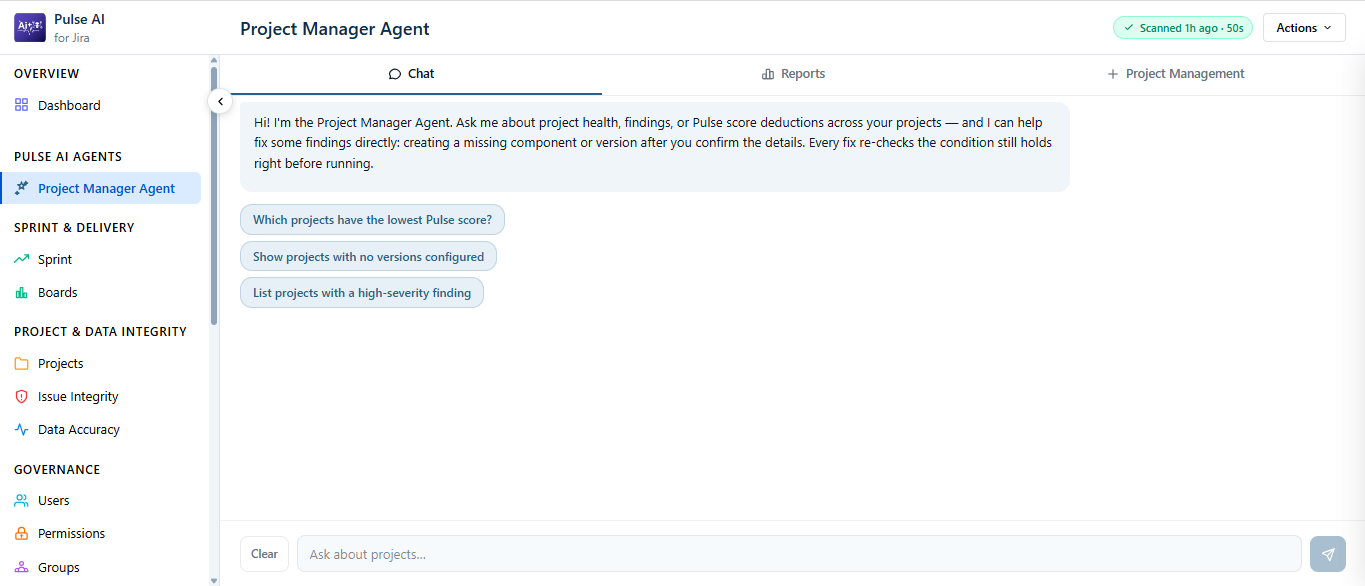
Page Layout
| Area | What It Shows |
|---|---|
| Sidebar | The agent listed under Pulse AI Agents, alongside the other Pulse AI sections. |
| Header | Agent name, the last scan time (for example, Scanned 1h ago), and an Actions menu. |
| Tabs | Chat, Reports, and Project Management. |
| Input bar | Type a question in Ask about projects... and send. Select Clear to reset the conversation. |
Suggested Prompts
The Chat tab opens with a greeting and starter prompts you can click:
- Which projects have the lowest Pulse score?
- Show projects with no versions configured
- List projects with a high-severity finding
Note: If the agent is missing from the sidebar, an admin may have turned it off in Pulse AI Settings → Agents. See Turning the Agent On or Off →.