Display Settings & Export
Card Colors
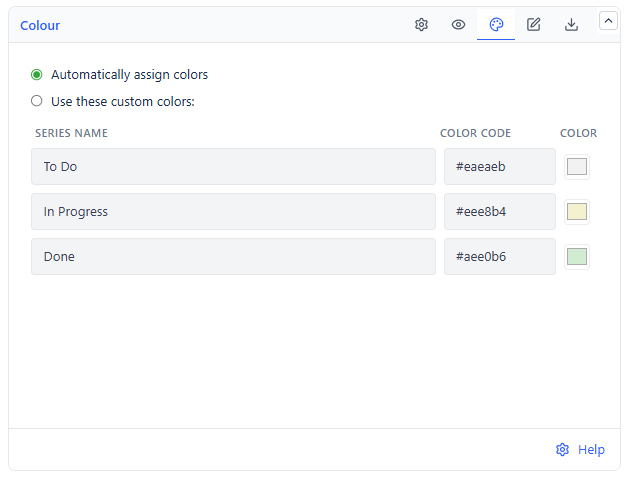
Cards are colored by the status category of the item, so progress is visible from across the room.
| Category | Default |
|---|---|
| To Do | Light grey |
| In Progress | Light yellow |
| Done | Light green |
Switch color mode to Custom to set each of the three individually - useful for matching a house palette or improving contrast on a large display.
Display Options
| Setting | What It Does | Default |
|---|---|---|
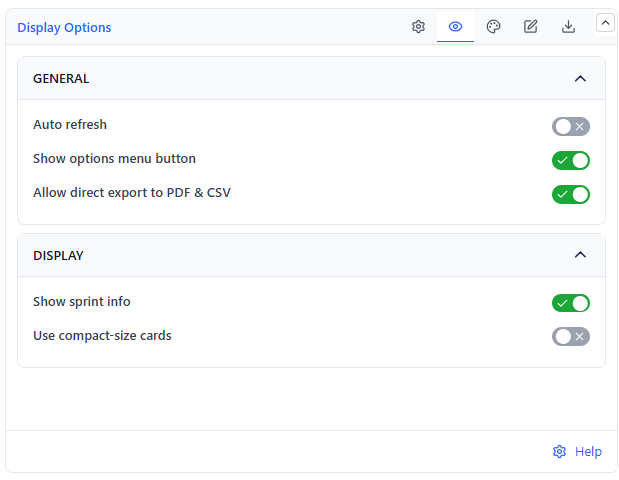
| Show sprint info | Sprint name and dates in the header (Scrum boards only) | On |
| Use compact-size cards | Smaller cards, more items visible at once | Off |
| Show options menu button | The in-view refresh and export menu | On |
| Allow direct export to PDF & CSV | Whether viewers can export | On |
| Auto refresh | Periodic re-fetch, in minutes | Off (10 min) |
For a wall-mounted display: compact cards on, auto-refresh on, options menu off. The board then runs unattended and nobody can accidentally reconfigure it.
Export
| Format | Contains |
|---|---|
| The wallboard as it appears, columns, cards, and swimlanes intact | |
| CSV | Every item with its status, assignee, priority, and estimate, plus its board column for a Board source |
PDF export renders issue-type and priority icons correctly, so the exported board is readable as a standalone document - suitable for attaching to a sprint report.
Common Use Cases
Standup wallboard. Board source, active sprint, a board quick filter for recent changes if your board has one, auto-refresh on. Discussion follows the cards that moved.
Workload check. Swimlanes by assignee, no quick filters. One glance shows who has too much in progress.
Epic tracking. Swimlanes by epic with a JQL source scoped to the release. Shows which epics are stalled without opening a plan.
Cross-team status. Projects source, status-category grouping, swimlanes by project. Fits a single dashboard row and needs no board access.