Sprint Burndown & Burnup
Overview
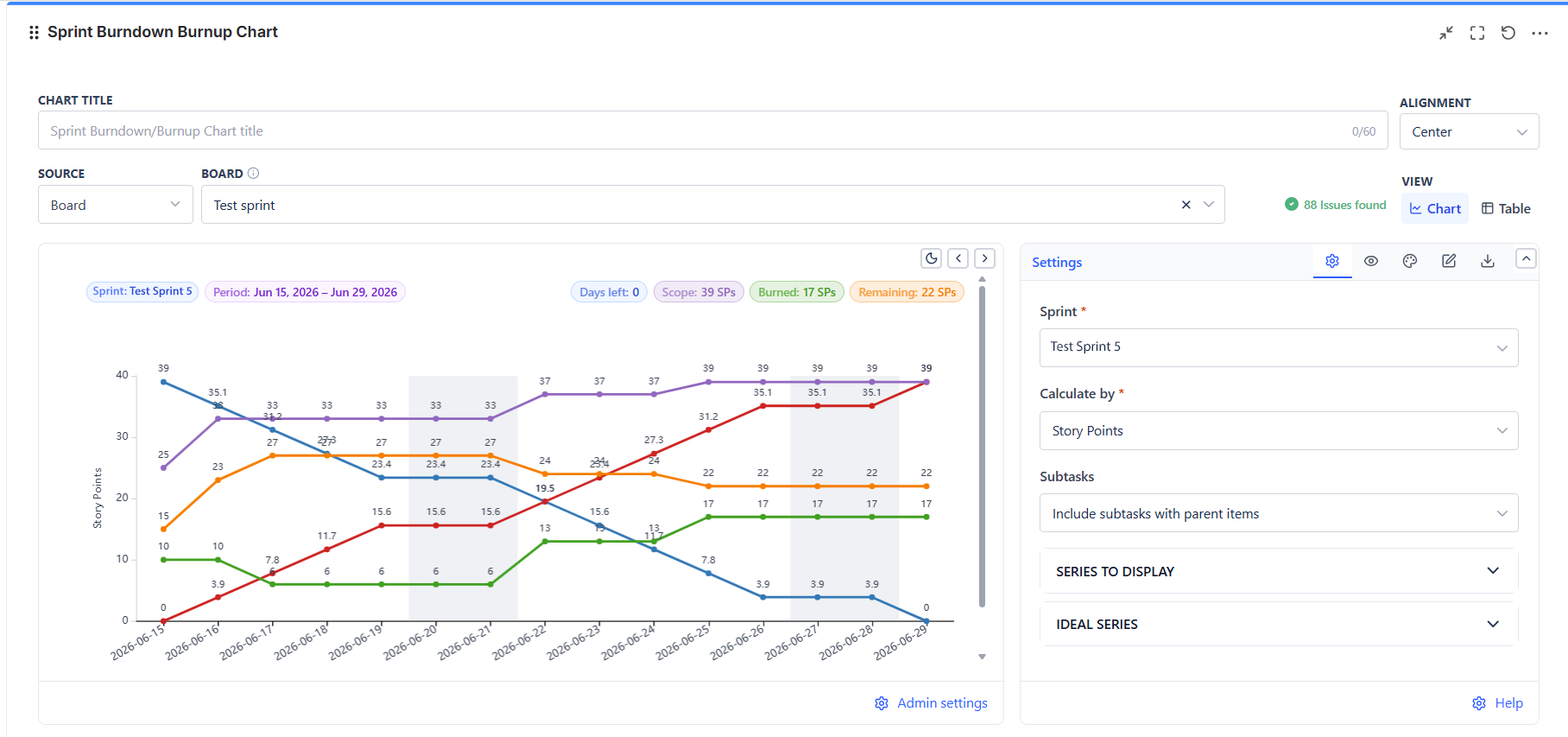
This gadget is board-scoped by design: you pick a board, then a sprint on that board. Sprint dates, scope, and completion all come from the sprint itself, so the chart matches what the team committed to.
Overview
| Feature | Description |
|---|---|
| Five Series | Remaining, Burned, Scope, Ideal Burndown, and Ideal Burnup - each toggled on or off (Remaining Time Estimate allows only Remaining and Ideal Burndown) |
| Seven Measures | Story points, story point estimate, original estimate, remaining estimate, time remaining and spent, work item count, or a numeric custom field |
| Scope Line | Shows scope changes mid-sprint - the single most useful series for retrospectives |
| Configurable Done | Define completion by the board's last column or by an explicit status list |
| Weekend Handling | Treat weekends as working or non-working days, or hide them entirely |
| Data Table View | The work items behind the chart, with their status, completion note, and estimate |
How to Read Each Series
| Series | Reads As |
|---|---|
| Remaining | Work still open. Should fall towards zero |
| Burned | Work completed so far. Should rise |
| Scope | Total committed work. A flat line means a stable sprint |
| Ideal Burndown | Straight line from full scope to zero - the pace needed to finish on time |
| Ideal Burnup | Straight line from zero to full scope - the mirror image, for teams who prefer counting up |
Reading the Shape
- Remaining above ideal = behind pace. The gap at any day is roughly the catch-up needed
- Remaining flat then dropping at the end = work finished in a batch. Predictable-looking totals, unpredictable delivery
- Scope line stepping up mid-sprint = work was added after commitment. This explains a "failed" sprint more often than slow delivery does
- Remaining rising = new work is arriving faster than existing work closes
- Both remaining and ideal hitting zero together = a well-paced sprint
Action pattern: In sprint review, read the scope line first. If it moved, the burndown was never going to land where it was drawn - and that is a planning conversation, not a delivery one.
Board and Sprint Selection
- Pick the board - only Scrum boards have sprints
- Pick the sprint, or choose Latest sprint (auto) so the gadget follows the active sprint and never needs re-editing
Auto-latest is the right choice for any dashboard that stays up across sprints. Pick a specific sprint only for a fixed retrospective report.