Templates For Dynamic Filter Controller
Use Templates to add a ready-made set of filter fields and quick filters to the active tab of your Dynamic Filter Controller gadget. Templates help you start faster and then fine-tune the tab for your team.
Where to find it
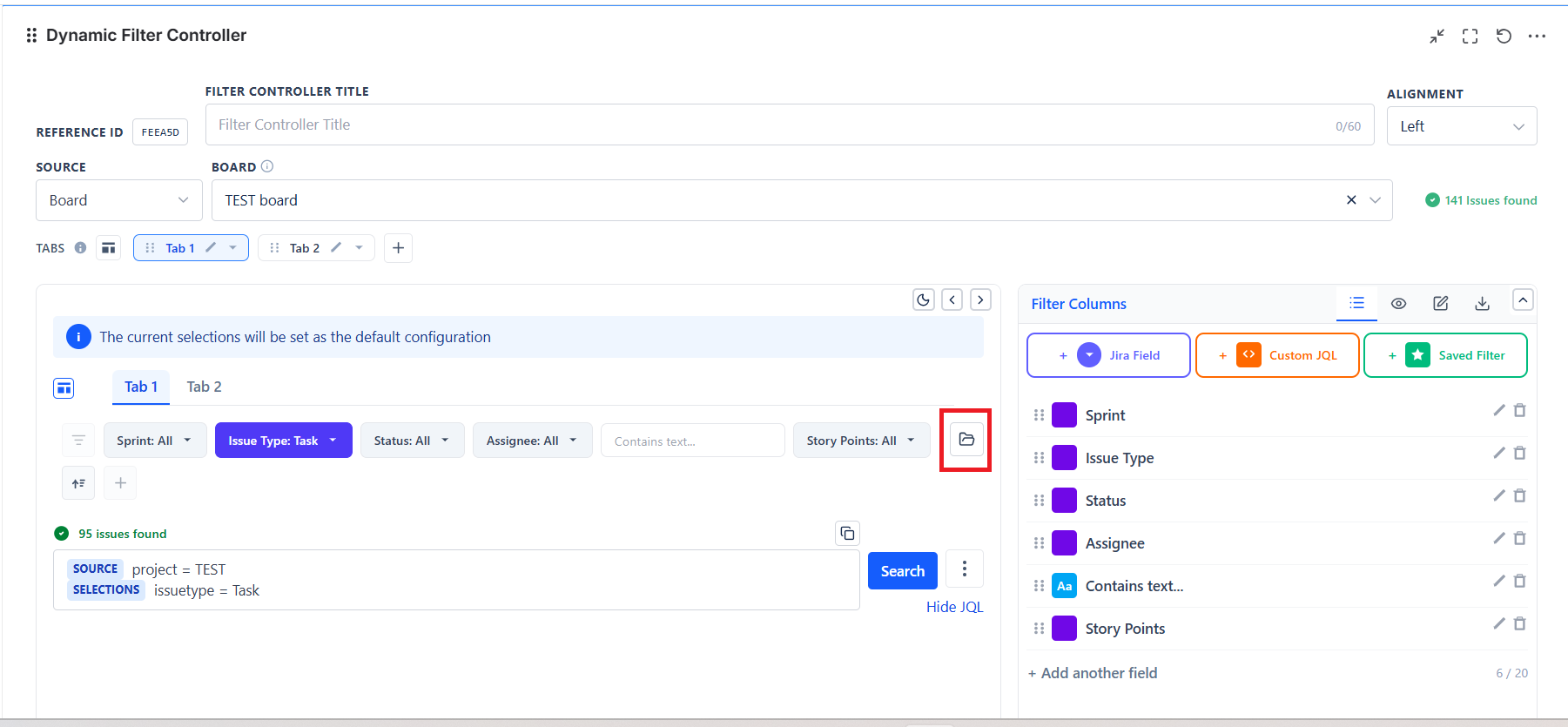
- Open a Dynamic Filter Controller gadget.
- Click Edit.
- Click the folder icon at the right-hand end of the filter bar.
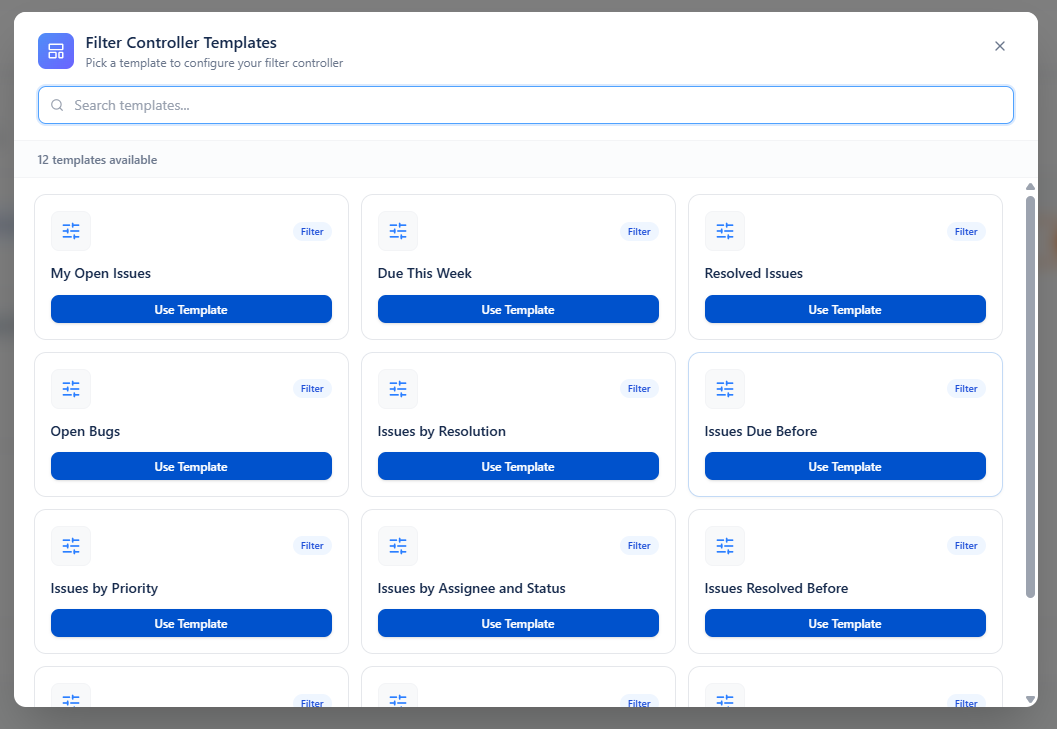
- Choose the template that matches the type of work you want to manage.
The gallery lists all twelve templates, with a search box if you know the name:
What Templates do
- Apply only to the active tab. Other tabs stay as they are.
- Rename the active tab to the template's name, so the tab is easy to recognise afterwards.
- Replace the active tab's field list with the fields from the selected template.
- Add the template's quick filters as toggle-style filter chips.
- Carry over the current project selection from the gadget data source into the active tab's default selections.
- Keep tabs enabled and keep the selected tab active after the template is applied.
- Leave the gadget data source unchanged. Templates do not switch Projects, Saved Filter, or Custom JQL for you.
- Do not create new tabs and do not remove existing tabs.
| Area | What happens when you apply a template |
|---|---|
| Active tab fields | The current field list on the active tab is replaced by the template field set. |
| Quick filters | Template quick filters are added as Custom JQL toggle chips. Filters marked active in the template start enabled. |
| Selected projects | The current project selection is reused as a default selection on the active tab. |
| Other tabs | No changes are made to other tabs. |
| Data source | No change. The existing source type and source values remain in place. |
| Gadget layout and display options | No chart-style or admin-setting change is made by templates. |
Two kinds of template
| Kind | What happens when you apply it |
|---|---|
| Applied immediately | The template's quick filter is switched on straight away, using a fixed JQL built from Jira functions. Nothing is asked of you |
| Asks first | A dialog opens and asks for the values it needs. Your answers become one quick-filter toggle. Cancelling the dialog leaves the gadget completely unchanged |
Either way the generated toggle starts active, and the filter fields listed below are placed on the tab.
Built-in template catalog
| Template | Kind | Asks you for | Filter fields placed on the tab |
|---|---|---|---|
| My Open Issues | Applied immediately | - | Project, Status, Priority, Issue Type, Updated, Contains text… |
| Due This Week | Applied immediately | - | Project, Due Date, Assignee, Priority, Status, Contains text… |
| Open Bugs | Applied immediately | - | Project, Status, Priority, Assignee, Created, Contains text… |
| Resolved Issues | Asks first | Resolved since (a date) | Project, Assignee, Issue Type, Priority, Contains text… |
| Issues Resolved Before | Asks first | Resolved before (a date) | Project, Assignee, Priority, Issue Type, Contains text… |
| Issues Due Before | Asks first | Due before (a date) | Project, Due Date, Assignee, Priority, Status, Contains text… |
| Last Updated | Asks first | Updated since (a date) | Project, Status, Assignee, Priority, Issue Type, Updated, Contains text… |
| Issues by Priority | Asks first | Priority | Project, Priority, Status, Assignee, Issue Type, Contains text… |
| Open Issues by Priority | Asks first | Priority | Project, Priority, Status, Assignee, Issue Type, Updated, Contains text… |
| Issues by Resolution | Asks first | Resolution | Project, Resolution, Assignee, Priority, Issue Type, Contains text… |
| Issues by Assignee and Status | Asks first | Assignee, Status | Project, Assignee, Status, Priority, Issue Type, Updated, Contains text… |
| Issues by Status and Resolution | Asks first | Status, Resolution | Project, Status, Resolution, Assignee, Priority, Issue Type, Contains text… |
The JQL behind the three immediate templates
| Template | JQL applied |
|---|---|
| My Open Issues | assignee = currentUser() AND statusCategory != Done |
| Due This Week | due >= startOfWeek() AND due <= endOfWeek() |
| Open Bugs | issuetype = Bug AND statusCategory != Done |
These use Jira functions rather than fixed values, so they keep working as the current user and the current week change.
When a template asks for more than one value, the answers are combined with AND.
Note: A Dynamic Filter Controller template is a starter pack for one tab. It gives that tab a useful set of fields and one quick filter, but it does not rebuild the whole gadget.