Rich Content Formatting
Status Macro
Status Macro
What It Does
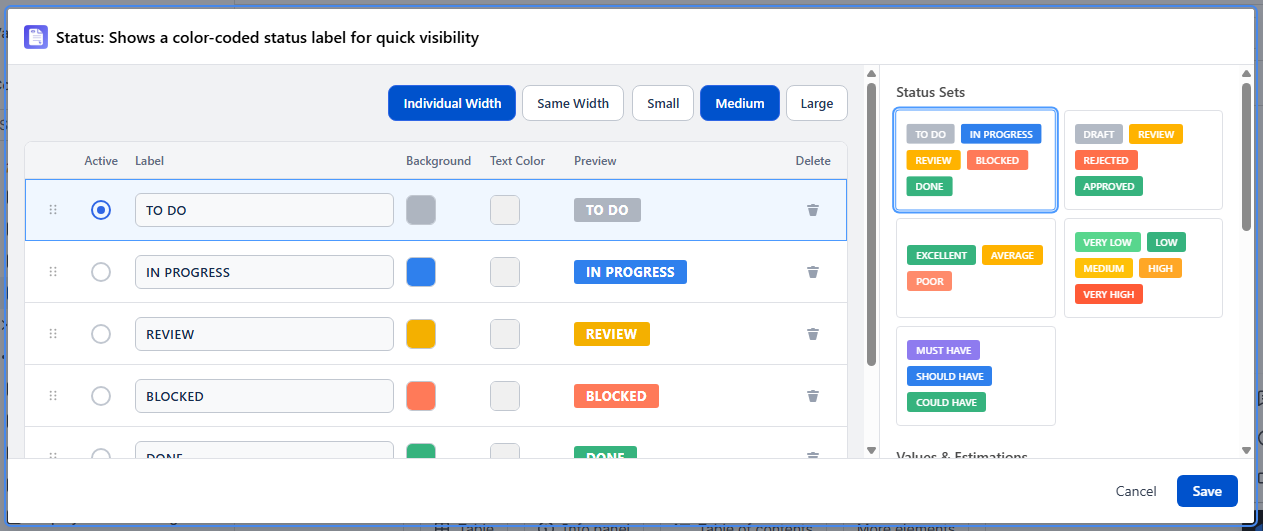
The Status macro places a single, color-coded, clickable status badge on your page, drawn from one of 13 preset sets covering workflows, estimations, and other classifications. Clicking the badge opens a picker where the viewer selects which value from that set applies right now - the choice is then saved on the page as that badge's current status, visible to everyone who views the page afterward.
13 Preset Status Sets
Status Sets
| Set | Values |
|---|---|
| Workflow | TO DO, IN PROGRESS, REVIEW, BLOCKED, DONE |
| Approval | DRAFT, REVIEW, REJECTED, APPROVED |
| Quality | EXCELLENT, AVERAGE, POOR |
| Priority | VERY LOW, LOW, MEDIUM, HIGH, VERY HIGH |
| MoSCoW | MUST HAVE, SHOULD HAVE, COULD HAVE |
Values & Estimations
| Set | Values |
|---|---|
| Linear scale | ?, 1, 2, 3, 4, 5, 6, 7, 8, 9, 10 |
| Fibonacci | ?, 1, 2, 3, 5, 8, 13, 20, 40, 100 |
| T-shirt sizes | ?, XS, S, M, L, XL |
| Completion | 0%, 25%, 50%, 75%, 100% |
Miscellaneous
| Set | Values |
|---|---|
| Tier | PLATINUM, GOLD, SILVER, BRONZE |
| Rarity | Common, Magical, Set, Rare, Legendary, Mythic |
| Star rating | ★, ★★, ★★★, ★★★★, ★★★★★ |
| Color dots | green, yellow, orange, gray |
Configuration
Select a preset set from the visual card picker in the settings panel - each card previews the values in that set. This sets which set of values the badge can be changed between; it does not display all the values at once. Insert one Status macro per badge you want on the page (e.g., one per table row, one per tracked item).
Use Cases
- Project status table with one Status macro per row, each set to the Workflow set, updated by clicking as work progresses
- Backlog items with a story-point badge (Fibonacci set) that authors click to update as estimates are refined
- Risk register with a priority badge per item
- Release notes with a completion-percentage badge per feature, updated as work finishes